Article
How SSDs Work: NAND Flash, Controllers, and Memory
Sammy · October 31, 2026
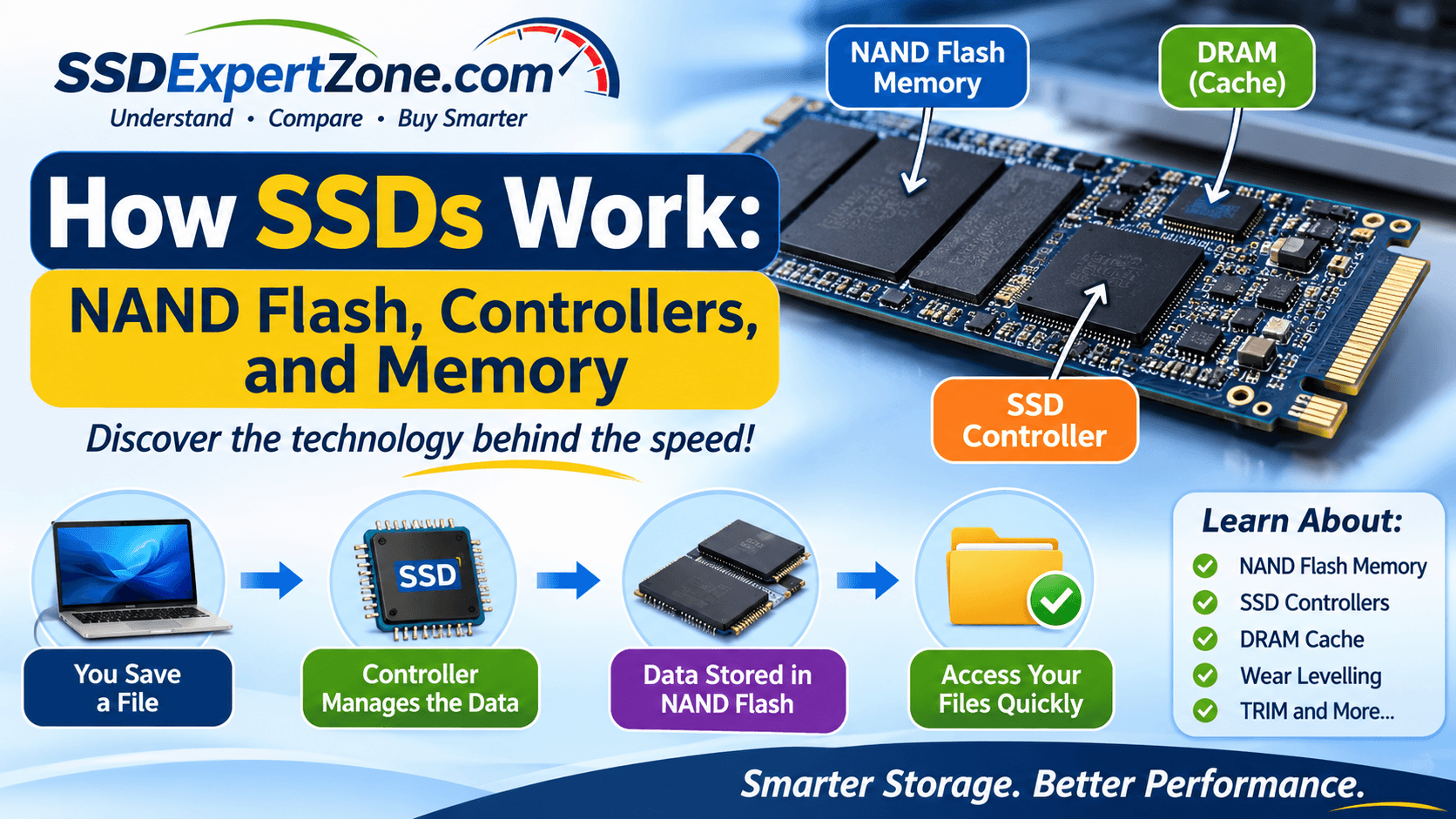
When you save a document, install a program, or transfer photos to your computer, where does that information go? If your computer uses a Solid-State Drive (SSD), the data is stored using flash memory rather than the spinning magnetic disks found in traditional hard disk drives (HDDs).
But how does an SSD actually work?
An SSD uses several important components to store, organise, retrieve, and protect data. The main ones include NAND flash memory, a controller, firmware, and sometimes DRAM or another type of memory cache.
Understanding these components helps explain why SSDs are fast, how they manage data, and why different SSDs can have different performance levels.
In this guide, we explore how SSDs work, what NAND flash memory does, the role of the SSD controller, and how memory and caching help improve performance.
1. How Does an SSD Store Data?
An SSD stores information electronically using NAND flash memory.
Unlike a traditional hard drive, which uses spinning platters and a moving read/write head, an SSD has no moving mechanical parts. It stores data in tiny electronic cells built into memory chips.
These cells hold electrical charge in a way that represents digital information.
Computers process information using binary numbers: 0s and 1s. NAND flash memory stores these bits by using different electrical charge levels in its memory cells.
Because the information is stored electronically, an SSD can access data without waiting for a mechanical disk to spin or a read/write head to move into position.
This is one of the main reasons SSDs generally provide faster access to data than traditional HDDs.
2. What Is NAND Flash Memory?
NAND flash is the primary storage technology used in most modern SSDs.
It is a type of non-volatile memory, meaning it can retain stored information even when the computer is switched off.
NAND memory is organised into memory cells. These cells are arranged into pages, and pages are grouped into larger units called blocks.
Here is a simplified explanation:
- Memory cells: Store individual bits of information.
- Pages: Groups of cells that are commonly read and programmed together.
- Blocks: Groups of pages that are generally erased together.
This organisation is important because NAND flash does not work exactly like ordinary computer RAM.
For example, an SSD can read data in pages and program data into available pages, but erasing NAND usually happens at the larger block level.
When existing data needs to be replaced, the SSD may need to move valid information elsewhere before erasing the block containing the old data.
The SSD controller manages these operations in the background.
3. Different Types of NAND Flash Memory
Not all NAND flash memory stores the same number of bits in each memory cell.
The main types include SLC, MLC, TLC, and QLC.
NAND type
Bits per cell
General characteristics
SLC
1
High endurance and performance; expensive per unit of storage
MLC
2
Stores more data per cell than SLC
TLC
3
Common in consumer SSDs; balances capacity, cost, and performance
QLC
4
Higher storage density and often lower cost per GB, with trade-offs in endurance and sustained write performance
SLC (Single-Level Cell)
SLC stores one bit of information in each memory cell.
It generally offers high endurance and fast performance, making it useful in specialised and enterprise storage applications. However, it is more expensive per unit of capacity.
MLC (Multi-Level Cell)
MLC commonly refers to NAND that stores two bits per cell.
It provides greater storage density than SLC. Traditional MLC is less common in mainstream consumer SSDs today.
TLC (Triple-Level Cell)
TLC stores three bits in each memory cell.
It is widely used in consumer SSDs because it offers a practical balance between storage capacity, cost, and performance.
QLC (Quad-Level Cell)
QLC stores four bits per cell.
It allows manufacturers to produce higher-capacity SSDs at a lower cost per gigabyte. However, QLC generally has lower write endurance than TLC and may experience slower sustained write speeds, depending on the drive design and workload.
Important: The type of NAND alone does not determine whether an SSD is good or bad. The controller, firmware, cache design, overall build quality, and intended workload also matter.
4. What Is an SSD Controller?
The SSD controller is one of the most important components inside a solid-state drive.
Think of it as the drive's manager. It coordinates how information is stored, retrieved, moved, and maintained.
Whenever your computer requests data from an SSD or sends new information to be saved, the controller helps manage the operation.
Its responsibilities include:
- Managing communication between the computer and the NAND flash memory.
- Locating stored data.
- Managing read and write operations.
- Distributing writes across memory cells.
- Correcting certain types of data errors.
- Managing bad memory blocks.
- Handling garbage collection and other maintenance operations.
Without the controller, the SSD would not be able to organise and manage its NAND memory effectively.
How Does the Controller Find Your Data?
An SSD uses a process called Flash Translation Layer (FTL) management.
The FTL maps the logical addresses used by the computer to the physical locations where information is stored in NAND flash.
For example, when your computer asks for a particular file, it sends a storage request. The controller uses its mapping information to locate the relevant data in the NAND memory.
This process allows the computer to work with the SSD as a storage device without needing to know the exact physical location of every piece of information.
5. What Is DRAM in an SSD?
Some SSDs include DRAM (Dynamic Random Access Memory), which acts as a temporary working memory for the drive.
It is different from NAND flash.
NAND flash stores your files and keeps them when the computer is switched off. DRAM is volatile memory, meaning it loses its contents when power is removed.
In many SSD designs, DRAM helps store mapping information used by the controller to locate data in NAND flash.
Having this information readily available can improve certain workloads, particularly when the drive handles many small or random data requests.
What Is a DRAM-less SSD?
A DRAM-less SSD is a drive that does not have its own dedicated DRAM chip.
This does not mean it has no memory. It still uses NAND flash to store your files and has a controller to manage the drive.
Some DRAM-less NVMe SSDs support Host Memory Buffer (HMB). This feature allows the SSD to use a small amount of the computer's system RAM for certain mapping information.
DRAM-less SSDs can be more affordable and perform well for many everyday tasks. However, performance can vary depending on the model and workload.
When comparing SSDs, do not judge a drive only by whether it has DRAM. Consider its actual performance, endurance rating, warranty, capacity, and intended use.
6. What Is Firmware in an SSD?
Firmware is the software built into the SSD that controls how its hardware operates.
It works with the controller to manage storage operations and maintain the drive.
Some of its responsibilities include:
- Managing data placement.
- Coordinating read and write operations.
- Supporting error correction.
- Managing wear levelling.
- Handling garbage collection.
- Supporting communication with the computer.
Firmware helps determine how efficiently an SSD uses its memory and responds to different workloads.
Manufacturers sometimes release firmware updates to improve compatibility, address bugs, or resolve security and performance issues.
Before updating an SSD's firmware, always follow the manufacturer's instructions and back up important data.
7. How Does an SSD Read and Write Data?
Now that we understand the main components, let's look at what happens when you save or open a file.
How an SSD Writes Data
When you save a file:
- Your computer sends a write request to the SSD.
- The controller receives the request.
- The controller determines where the new information should be stored.
- The data is programmed into available NAND flash pages.
- The SSD updates its mapping information so the computer can locate the stored data later.
The controller manages the process, including situations where existing data needs to be replaced.
How an SSD Reads Data
When you open a file:
- Your computer sends a read request.
- The controller receives the request.
- The controller checks its mapping information to locate the data.
- The NAND flash memory retrieves the requested information.
- The data is sent back to the computer.
Because there are no spinning disks or moving read/write heads, an SSD can retrieve data with very little mechanical delay.
8. What Is Wear Levelling?
NAND flash memory has a limited number of program-and-erase cycles.
This means memory cells can only be written to and erased a certain number of times before they wear out.
To help extend the useful life of an SSD, the controller uses a technique called wear levelling.
Wear levelling distributes write and erase operations across the available NAND memory rather than repeatedly using the same blocks.
This helps prevent certain areas of the drive from wearing out much earlier than others.
Wear levelling is one of the important processes that helps SSDs manage their limited write endurance.
9. What Is Garbage Collection in an SSD?
Garbage collection is another process managed by the SSD controller.
When you delete a file, the SSD usually marks the corresponding data as no longer needed. However, the information may remain physically stored in NAND flash until the relevant blocks are erased.
Remember that NAND flash is generally erased in blocks rather than individual pages.
Garbage collection helps the SSD identify blocks containing a mixture of valid and outdated data.
The controller can move the valid data to another location, erase the block, and make the space available for future writes.
This process helps the SSD maintain available storage space and manage its performance.
10. What Is TRIM and Why Does It Matter?
TRIM is a command that allows an operating system to inform a supported SSD that certain data blocks are no longer needed.
For example, when you delete a file, your operating system may send a TRIM command to the SSD to identify the storage locations that can be reclaimed.
This helps the SSD prepare for future write operations and manage garbage collection more efficiently.
TRIM is supported by modern operating systems and SSDs, although its operation depends on the operating system, file system, drive, and connection setup.
You generally do not need to manually send TRIM commands during everyday computer use.
11. Why Do SSDs Have Different Speeds?
You may have noticed that some SSDs are advertised as faster than others.
This is because SSD performance depends on several factors, including:
- Interface: SATA and NVMe SSDs use different storage communication technologies.
- NAND type: Different NAND technologies have different performance characteristics.
- Controller: The controller affects how efficiently data is managed.
- DRAM and caching: Memory and cache design can influence performance.
- Capacity: Different capacities of the same SSD model can have different performance.
- Workload: Reading small files, transferring large files, and running applications place different demands on a drive.
For example, an NVMe SSD using a PCIe connection can offer much higher transfer speeds than a SATA SSD.
However, a faster advertised sequential speed does not necessarily mean every everyday computer task will feel proportionally faster.
12. What Happens When You Switch Off Your Computer?
One of the important features of NAND flash memory is that it is non-volatile.
This means your stored files remain on the SSD even when your computer is switched off.
When you turn your computer back on, the SSD can retrieve the stored information when requested.
This is different from DRAM, which is volatile and loses its contents when power is removed.
However, an SSD is not a substitute for a backup. Drives can fail, and data can be lost through hardware problems, accidental deletion, malware, or other causes.
Always keep important files backed up in another location.
Frequently Asked Questions
1. What is the main component of an SSD?
NAND flash memory is the primary storage component. It stores your files and other information even when the computer is switched off.
2. What does an SSD controller do?
The controller manages communication with the computer and coordinates how data is read, written, organised, and maintained inside the SSD.
3. Is NAND flash the same as RAM?
No. NAND flash is non-volatile storage that retains information without power. RAM is generally volatile working memory used by a computer while it is running.
4. Do all SSDs have DRAM?
No. Some SSDs have dedicated DRAM, while others are DRAM-less. Some DRAM-less NVMe drives use Host Memory Buffer technology.
5. What is the difference between TLC and QLC NAND?
TLC stores three bits per cell, while QLC stores four. QLC offers greater storage density, but generally has lower write endurance and may have lower sustained write performance.
6. Can an SSD lose data when switched off?
Yes, data loss is possible under certain circumstances, particularly if a drive is failing or has been stored without power for an extended period. NAND data retention varies with the condition of the memory and other factors. Keep important files backed up.
7. What makes SSDs faster than HDDs?
SSDs use electronic flash memory rather than spinning magnetic disks and moving read/write heads. This allows them to access data with much lower latency.
Conclusion
An SSD may look like a simple storage device, but several technologies work together to make it function.
NAND flash memory stores your data, the controller manages storage operations, DRAM or other caching mechanisms can support performance, and firmware coordinates how the drive operates.
Processes such as wear levelling, garbage collection, and TRIM also help the SSD manage its memory efficiently.
Understanding these components makes it easier to compare SSD specifications and choose a drive that suits your computer and storage needs.